Amethyste is the Ecrin module dedicated to Well Performance Analysis. It has its technical roots in WAM, a tried and tested WPA program developed and used by Marathon since 1986. It spans the divide between data and datum in Saphir NL, Topaze NL and Rubis and provides a natural extension to results obtained from Emeraude.
Well performance analysis software has been developed by fine vendors for many years, and their results can be imported into Ecrin using industry standard formats. However, for the sake of interconnectivity and accuracy, such a tool was needed in the Ecrin suite.
New workflows can be performed much faster than before with consistency across the range for wellbore modeling as well as IPR calculations. An IPR defined in Saphir NL can be drag and dropped in Amethyste, and the reverse. More importantly, a wellbore model defined in Amethyste can be dropped into Saphir NL, Topaze NL and Rubis where it can be run dynamically with complete control and no blind table interpolation.
Amethyste v4.20 is not sold separately. It is a free add-on to any Saphir NL, Topaze NL, Emeraude or Rubis license under active maintenance and under the current pricelist.
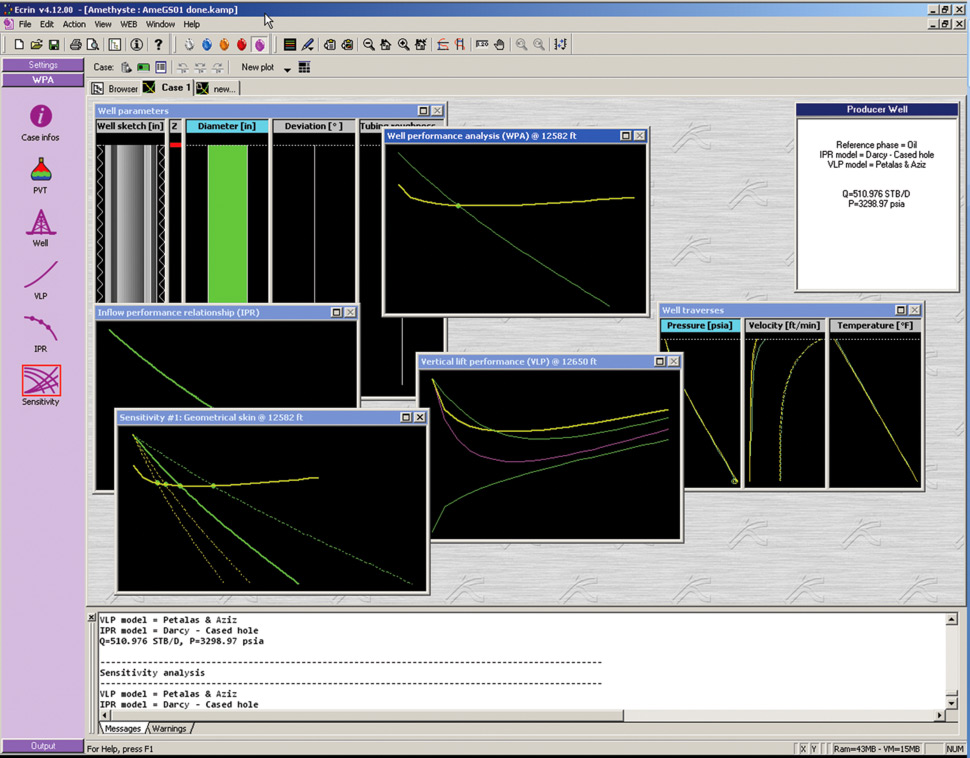
Amethystemain winow
A familiar Workflow
The workflow in Amethyste is similar to other Ecrin modules, with a control panel guiding the engineer through the default steps. This includes (1) defining the type of problem (2) defining the PVT, (3) defining the well, (4) Calculating the VLP, (5) calculating the IPR, (6) running the sensitivity analysis.
1+2. Defining the problem and PVT
The document initialization dialog is very straightforward. The user defines the type of well (producer or injector) and the reference phase. The user also defines the PVT, which is the same standard black oil PVT used in other Ecrin modules.
3. Defining the Well
Wellbore and flow line can be treated independently or together. The wellbore flow may take place in the tubing or the annulus. Well trajectory, ID, roughness and detailed completion are also defined. Any number of restrictions can be included. A well sketch is available for graphical display using a library of pre-defined completion elements. A well plot is then automatically built.
4. Vertical Lift profile (VLP)
Multiple pressure drop models may be defined, though one has to be selected as reference. Each model can be assigned factors to honor observed data. A temperature profile must be loaded or calculated. The built-in temperature model uses a segmented model incorporating convection, conduction, and thermal compressibility effects.
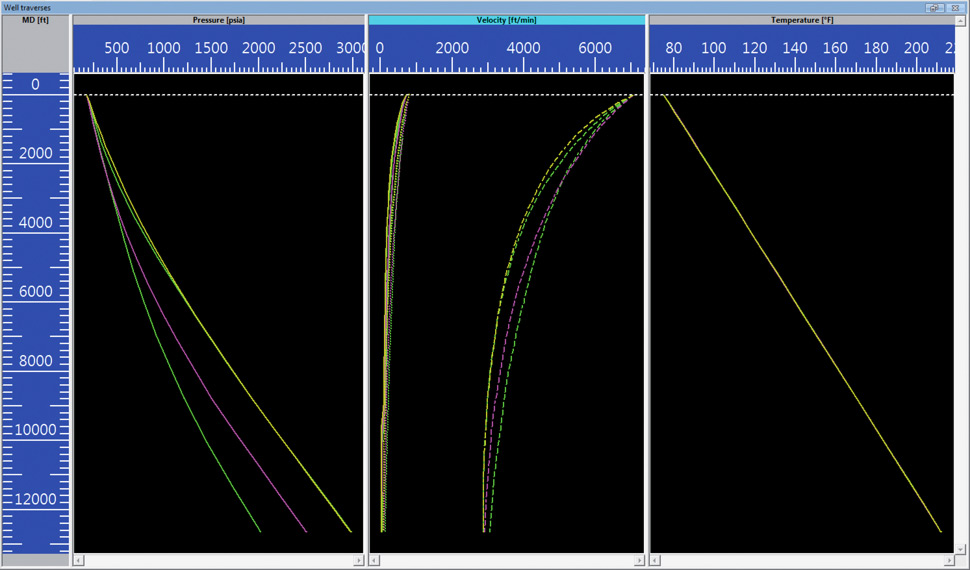
Amethyste’s VLP option generates traverses (p vs. depth) and VLP plots (p vs. q). For each scenario, user data can be input, manually, from a file, or picked from production data. On validation, each scenario is run and the corresponding plot built. The plot content can be customized interactively.
5. Inflow Performance Relationship (IPR)
An IPR study performed with Saphir NL may be drag-dropped into Amethyste, and the IPR part of the analysis is immediately complete. Alternatively, test data can be loaded or drag-dropped into Amethyste. The IPR option, which is identical to that in Saphir NL, is used to define a single, or composite layer IPR. Multiple models can be selected and compared, though one has to be selected as reference. For those models using a skin, the user can input a total skin or calculate the skin components using a completion model. User data can be added for comparison with the model(s). An IPR plot is created that can be customized interactively.
4+5. Well Performance Analysis (WPA)
As soon as they both exist, Amethyste overlays the VLP and the IPR. The intersection point gives the solution for a given set of surface conditions.
6. Running Sensitivity
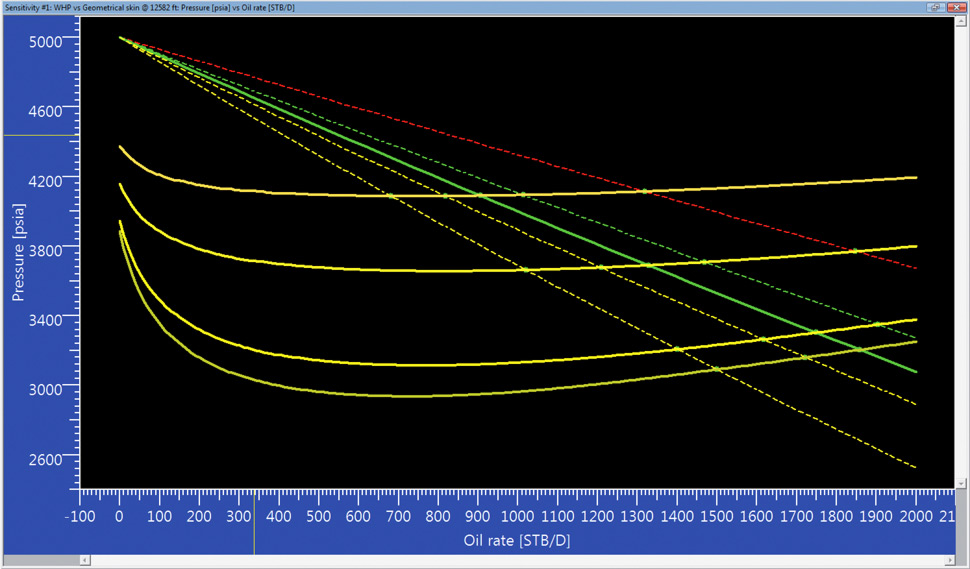
Amethyste can perform as many sensitivity studies as needed. A given study will correspond to a set of user controlled values for an IPR parameter, a VLP parameter or both. A cross correlation between the resulting rates and the sensitivity parameters can then be displayed. In v4.20 a new sensitivity study shows the evolution of the productivity index as a function of the time when the reservoir starts to deplete.
Report, export and plot
Amethyste has an extensive range of reporting, exporting and printing capabilities. Lift curves can be generated in Eclipse™ format for third party software.
The browser can be used to drag-drop components between analyses or between other Ecrin modules. In particular, a whole VLP object can be dropped in Saphir NL, Topaze NL or Rubis and run from those modules with the possibility of changing any model parameter, post-transfer.







 窥视卡
窥视卡 雷达卡
雷达卡
 发表于 2012-6-7 18:16:06

 提升卡
提升卡 置顶卡
置顶卡 沉默卡
沉默卡 喧嚣卡
喧嚣卡 变色卡
变色卡 抢沙发
抢沙发 千斤顶
千斤顶 显身卡
显身卡

 发表于 2012-6-21 14:51:25

 发表于 2012-6-21 17:08:04